Managing a few company tablets is relatively easy. What about hundreds of company devices across various departments, locations and shifts?
Purchasing the devices is only the beginning. They must also be charged, updated and secured. The devices must also be ready to use when the employee needs them.
Businesses that never sleep have specific challenges, from a managerial point of view, that increase costs and strain their IT departments.
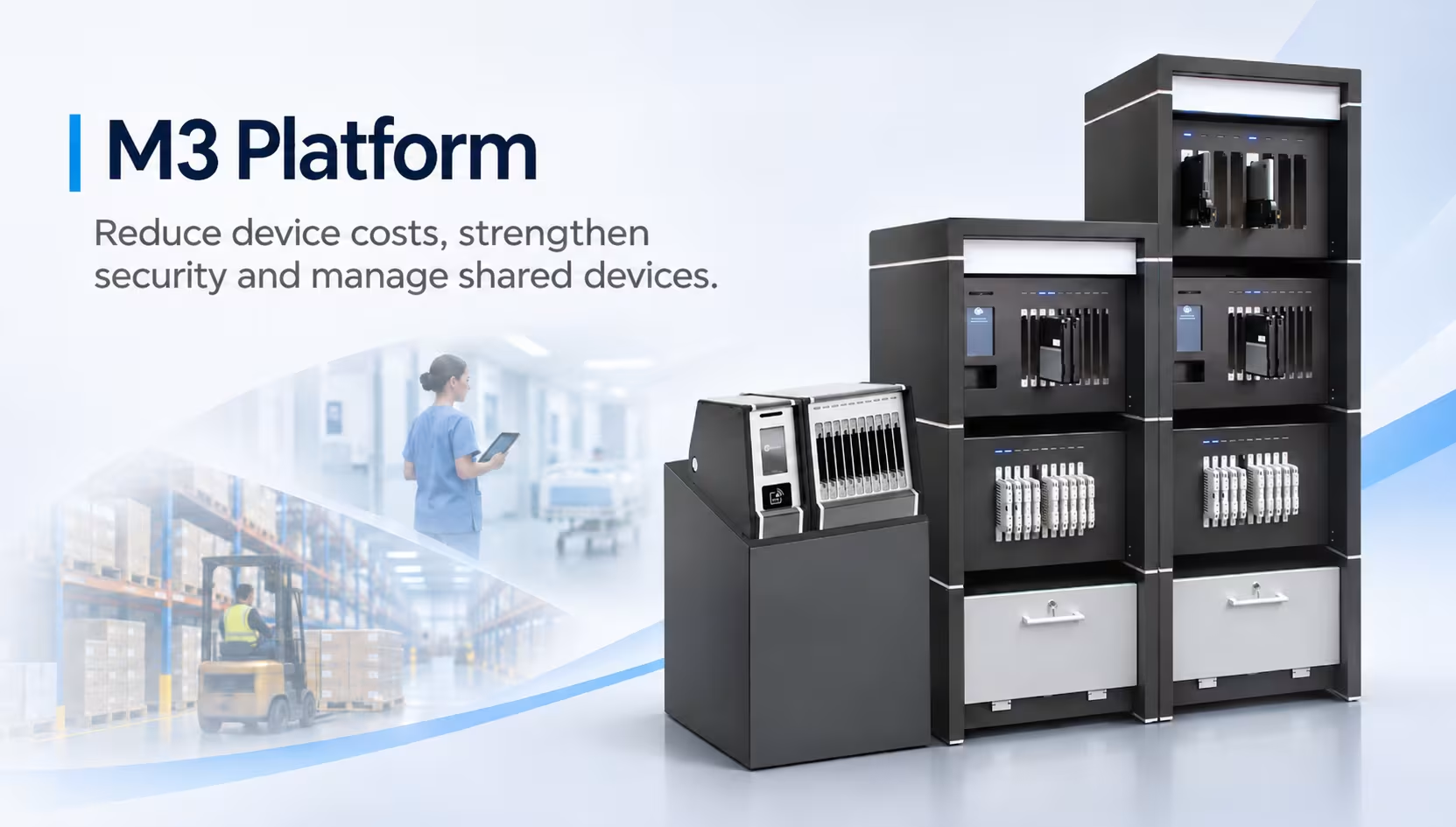
The M3 Platform helps businesses improve shared device management, reduce costs, and increase the security of shared devices, while also improving the continuity of business operations.
What Is the M3 Platform?
The M3 Platform uses software and hardware to manage fleets of mobile devices. It can charge mobile devices, deliver and install software and content updates, and monitor and control access to mobile devices.
Rather than preparing devices one at a time, IT teams can manage several tasks for multiple devices centrally.
This is beneficial when employees share mobile devices across shifts and/or equipment is located in different business locations.
Businesses evaluating device management can also consider Jacky’s Samsung enterprise mobility services.
Reduce Device Costs Through Smarter Sharing
Does every employee need a dedicated tablet?
Not always.
Let’s consider a logistics company with 150 employees on three shifts. If employees use the devices only during their working hours, sharing a pool of tablets among employees may work instead of providing a tablet to each employee.
M3 supports this approach by helping businesses prepare devices for successive users.
Fewer devices can mean lower procurement costs, reduced maintenance expenses and less equipment to replace.
For organisations managing hundreds of employees, this can contribute to a lower total cost of ownership.
The actual savings depend on device usage, sharing patterns and operating requirements.
Keep Devices Ready for 24/7 Operations
Manufacturing plants, oil and gas facilities, airports, hospitals, and many other places can operate 24/7 with multiple shifts.
When one employee finishes work, another may need the same device immediately.
But what happens if the battery is low or the required application hasn’t been updated?
Employees may have to wait, find another device or contact IT.
The M3 Platform helps solve this problem by managing updates, charging and readiness of devices to make the equipment ready for the next shift.
This reduces repetitive preparatory work and helps businesses maintain continuity for daily operations.
Strengthen Security and Control Device Access
Shared devices create security concerns, particularly when employees handle sensitive business information.
Who can access the device? What happens to the previous user’s data? Can employees install applications or transfer files without permission?
M3 provides centralised management of devices to extend existing security policies to provide protection of corporate information.
Businesses can restrict unauthorized data transfers, control network access, restrict the use of applications, and disable certain features on devices to reduce risks to security and protect information assets.
These features help organizations provide a more protected working environment, especially when devices are shared across teams.
Employee Authentication and Accountability
M3 offers features for employee authentication using biometric and facial recognition and ID card systems.
Having these features helps companies ensure that only authorized personnel can access and use shared devices.
They achieve accountability by allowing businesses to manage access control to devices in line with employee permissions.
Healthcare providers and industrial facilities can use these controls to supplement their information security procedures.
Reduce IT Work Through Automated Updates
Imagine an IT team responsible for manually updating applications on 300 tablets.
This is a repetitive and time-consuming task. The same work is repeated whenever a new update is released.
M3 automates the deployment of applications and updates of the operating systems on managed devices as well as content distribution.
This reduces repetitive tasks and allows IT teams to spend more time addressing technical issues that require their attention.
For businesses that operate in multiple locations, centralized management can also eliminate the need for routine device preparation at multiple locations.
Improve Visibility With Activity Logs and Reporting
When hundreds of devices are shared, managers need to know how the devices are being used.
Which devices are available? Are some devices being underutilized? Which devices may need management’s attention?
M3 provides detailed records of device usage, employee activity logs and operational reports.
These records provide management teams with visibility into device activity to monitor how the equipment is being used, recognize common issues and enhance accountability.
For example, a manufacturing company may identify that one department consistently requires additional tablets, and another department’s employees rarely use their device.
Increased visibility can assist the company to avoid unwarranted device purchases.
Support Business Growth and Different Devices
Managing devices at one location is relatively straightforward. Managing them across ten facilities is another matter.
As companies grow and expand, M3 can help manage larger device fleets across increased employee and corporate numbers, all without having to revamp and change the management process.
M3 supports the use of different device types and operating systems, including iOS and Android. This allows businesses to manage their equipment across different platforms.
This flexibility is great for businesses that use a mixture of mobile devices across the organization.
Where Can the M3 Platform Be Useful?
The benefits become clearer when we look at everyday business operations.
Airports: Ground-handling and maintenance teams can share tablets across shifts, while keeping operational applications available.
Healthcare: Hospitals can control the shared devices used for approved clinical and administrative tasks, and put access controls on data in accordance with data security requirements.
Oil and Gas: Field teams can access updated inspection forms, maintenance instructions and approved applications across operating locations.
Logistics: Warehouse employees can share devices for inventory management and order processing, reducing the need for individual device allocation.
Manufacturing: Production teams can use shared tablets for work instructions, quality checks and maintenance activities across shifts.
In each instance, the goal is to utilize the equipment in a better way and to eliminate disruptive and manual management of the process.
What If Your Business Already Uses MDM?
Some organisations already use Mobile Device Management (MDM) software.
But do these solutions ensure the device is charged, up-to-date, and ready for the next user?
Traditional MDM solutions usually address device administration and security. M3 also takes physical device readiness and shared-device workflows into account.
If requirements surrounding these aspects are covered by existing solutions, then M3 may not be necessary.
However, if IT teams still spend considerable time preparing devices, managing charging or checking availability, reviewing the current process may be worthwhile.
Is the M3 Platform Right for Your Business?
Before investing in a new device management solution, consider a few questions:
- How many mobile devices does your business manage?
- Are devices shared between employees or shifts?
- Could device sharing reduce future hardware purchases?
- How much time does IT spend charging and updating devices?
- Do you need stronger access controls and device usage reporting?
- Will your current system support additional locations?
Jacky’s Business Solutions helps UAE organisations assess their enterprise mobility and device management requirements.
The objective isn’t simply to introduce more technology. It’s to identify whether existing devices can be managed more efficiently and at a lower operational cost.
Discuss Your M3 Platform Requirements With Jacky’s Business Solutions
FAQ
Can M3 help reduce device costs?
Yes, where device sharing is practical. By helping employees use the same devices across different shifts, M3 may reduce the number of devices required and associated maintenance costs.
How does M3 support device security?
M3 offers centralized security controls. Employee authentication can be done using biometric, facial recognition or ID card methods. M3 can restrict the transfer of data, access to networks, and the features of the devices.
Which businesses can benefit from M3?
Businesses operating across multiple shifts or locations, e.g., in airports, healthcare, oil and gas, logistics and manufacturing, can benefit from M3’s shared device management.
Does M3 replace existing MDM software?
Not necessarily. M3 addresses device readiness and shared-device workflows, which may complement an organisation’s existing MDM solution.